
From Thousand A Month
Your first year off $1,000 a month, one month at a time.
Twelve worksheets, one mechanic from the show each. On the first Sunday of the month you fill in one, in about 20 minutes, and end with one line about how the month went. By month 12, the year is on paper.
Setup: checkout is not connected yet. Put the product checkout link in checkoutUrl in site/config.js.
One-time payment. Excel, Google Sheets and a printable PDF guide. 30-day refund, no questions.
You've seen the advice. Save 20 percent. Build an emergency fund. Pay off the card.
On $1,000 a month, the advice and the arithmetic don't meet. Twenty percent of $1,000 is $200, and after rent, food, insurance, gas, the phone and the card, the episode 1 month has $35 left.
So the problem isn't knowing what a budget is. It's that every month brings a different question. The card this month. Which bill comes out before payday. Whether to ask for more. What to do about the car you know is going to need something.
One sheet can't answer twelve different questions. A year of them, one at a time, can.
The story didn't cut its way out. It did one thing a month.
In episode 1, the turn comes in month three, sitting in a car outside a payday loan sign. Every line on the sheet is already as small as it goes. The only line that can still get bigger is the one at the top.
After that, nothing dramatic happens. One sentence in an interview. A thousand a month set to move by itself. Four steps written in a notebook, in order. Month by month, the sheet changes.
The Workbook is that, for your year: one mechanic a month, written as a worksheet you fill in, not a chapter you read.
About 20 minutes, once a month
First Sunday of the month: open that month's sheet.
Month 1 the first time, Month 2 the next, and so on.
Fill in the white boxes.
Your numbers, your bills, your card. The shaded boxes do the math.
Write one line in the check-in.
How the month went, in your words. Next month starts from there.
Miss a month? Pick it up the next Sunday. The months build on each other, but none of them locks.
Twelve months, twelve mechanics
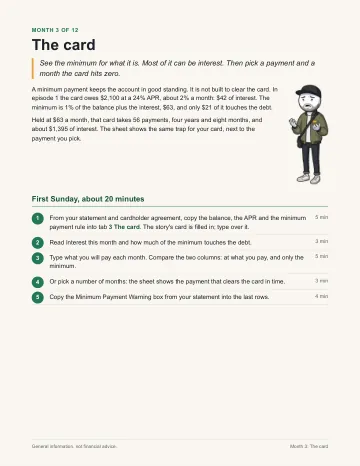
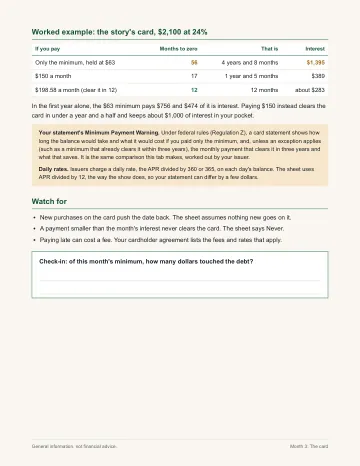
Each month is one idea from the show, turned into a worksheet and walked through in the PDF guide.
| Month | Title | What you fill in |
|---|---|---|
| 1 | Where it goes | Last month's statements, every line sorted into four buckets (Needs, Wants, Debt, Saving), and the share of take-home each one used |
| 2 | The bills calendar | Your paydays against your due dates, and which payday pays which bill |
| 3 | The card | The minimum-payment trap on your own balance, a payoff plan, and the interest you paid this month |
| 4 | The safety net starter | A first goal, the account it lives in, and the automatic transfer that moves it without a decision |
| 5 | The raise | An evidence log of what you actually do at work, the pay math, and the one-sentence ask the sheet writes from it |
| 6 | Several debts | Your debts on one page (up to six), ordered two ways: highest rate first (avalanche) and smallest balance first (snowball). You pick the order |
| 7 | Side income | A tracker for extra work, hours against dollars, and a set-aside line for the tax on it (general information; rules vary) |
| 8 | Benefits and the match | How to read a benefits sheet, what an employer match and vesting mean in general terms, and the match you collect against the match you leave behind |
| 9 | Move or stay | A calculator: rent plus commute where you are, against a closer place at a higher rent |
| 10 | Sinking funds | The car, gifts, yearly bills: the costs you know are coming, split into a monthly amount |
| 11 | Credit check-up | Where to get your free credit reports, what to look for, and how a dispute works, in general terms |
| 12 | The year scoreboard | Month 1 against your latest month (have, owe, net worth, take-home), your twelve check-ins, and next year's three lines |
Also included: the tool tabs
- Debt payoff
Up to six debts, two orders, months to zero and total interest for each.
- Sinking fund tracker
Up to eight known costs on one tab, each with a goal, a date and the monthly amount.
- Net worth
What you have minus what you owe, once a month, so you can see the direction.
- Start here
The first tab: what each box means and how to start in ten minutes.
Works the way you do
- Excel (.xlsx)
- Opens in Excel. Same look as the free Planner: white boxes with a green edge are yours, shaded boxes do the math.
- Google Sheets
- Import the same file into Google Sheets and it works there too. The guide shows how.
- Printable PDF guide, letter size
- One section per month: what the mechanic is, how to fill in the sheet, and the check-in. Print it, or read it on your phone.
Nothing connects to your bank. Nothing you type leaves your copy.

Is this for you?
It's for you if:
- You're paid by the hour or on a first salary, and the end of the month gets close.
- You've got the free Planner open and want to know what to do with it next month, and the month after.
- You'd rather fill something in for 20 minutes than read about money for two hours.
- You live in the US. The examples use US paychecks and US terms. (Most mechanics travel, but the benefits and credit months are written for the US.)
It's not for you if:
- You want investment picks, a stock or a fund. There are none in it, by design.
- You want someone to tell you what to do with your money. It explains how things work and does the arithmetic; the choices are yours. For advice on your situation, a licensed professional is the right call.
- You want an app that connects to your bank. This is a spreadsheet and a guide.
- You need help filing taxes. Month 7 explains setting money aside; it doesn't do a return.
$19, once
One payment. You keep the files. No subscription, nothing renews.
The Planner stays free whether you buy this or not.
Setup: checkout is not connected yet. Put the product checkout link in checkoutUrl in site/config.js.
The final price, including any sales tax or VAT, is shown at checkout. Checkout and tax are handled by our reseller, to fill: checkout platform (Lemon Squeezy, or the platform chosen).
30 days. If it's not for you, you get your money back.
Email to fill: support email within 30 days of buying, from the address you bought with, and say "refund". No form, no reason needed, and you can keep the files. The money goes back the way it came. Full policy: Refunds.
Questions
I already have the free Planner. What's different?
The Planner is one month on a page, plus 24 months side by side. The Workbook is a different worksheet for each month of the first year, each about one thing (the bills calendar, the card, the raise, several debts, sinking funds), with a guide that walks it. The Planner tells you where you are. The Workbook gives each month a job.
I'm not a spreadsheet person.
You type numbers into white boxes. That's the whole skill. The shaded boxes do every sum. In Excel they're locked, so a sum is not typed over by accident.
How long does it take?
About 20 minutes on the first Sunday of the month, plus the time it takes to find your numbers (last month's bank and card statements, a pay stub).
Do I have to start in January?
No. Month 1 is whichever month you start. The first Sunday after you buy is fine.
Does it work in Google Sheets?
Yes. Import the .xlsx into Google Sheets (File, then Import) and it works there. The guide shows the steps.
Does it work on my phone?
The PDF guide reads well on a phone. Filling in a sheet is easier on a laptop, but the Google Sheets app works.
Is this financial advice?
No. It's general information and a set of worksheets that do arithmetic on numbers you enter. It doesn't know your situation, and it doesn't tell you what to buy, invest in or sign. Rules and rates change and vary by state, so the guide says where to check the current figure.
I live in the UK or Europe. Will it work for me?
The budgeting months (1, 2, 3, 4, 6, 9, 10, 12) work anywhere, in any currency. Months 5, 7, 8 and 11 use US terms (benefits, the match, credit reports), so some of it won't fit. If that makes it not for you, the 30-day refund applies.
What do I actually get?
A download link by email right after you pay: the .xlsx workbook and the PDF guide. Keep them; they don't expire.
Can I share it?
It's licensed to you for your own use. Please don't post or resell the files. Full terms: Terms.
Who made this?
Thousand A Month, an animated YouTube series about money lives that start on $1,000 a month. The site and the Workbook are run by Axenor Consulting.
Month 1 starts the first Sunday.
Twelve worksheets. About 20 minutes each. One line at the end of every month. By month 12, the year is on paper.
Setup: checkout is not connected yet. Put the product checkout link in checkoutUrl in site/config.js.
One-time. 30-day refund, no questions. The Planner stays free.